Approving a post is not publishing a post. Between the draft you signed off on and the thing a customer sees on a phone, there is a queue, a connection to a platform you do not own, and a publish attempt that can fail after everyone has stopped looking. That middle stretch is what the word scheduling actually names. For a contractor, it is also where the posting quietly stops.
What the word scheduling actually covers
Most tools show you a calendar. The calendar is the part that is easy to draw, so it is the part that gets drawn. Underneath it, three separate things have to work, and only one of them is visible from the dashboard.
- 01The queue. A row holding your approved text, your image, and a time. This is the part the dashboard shows you, and the part that almost never breaks.
- 02The connection. An authorization the platform issued to the tool on your behalf. The platform can expire it, revoke it, or invalidate it when someone changes a password.
- 03The publish attempt. A request the tool sends at the scheduled minute, which the platform can accept, reject, or throttle. It happens without you in the room.
Confusing the three is how an owner ends up calling a tool broken when the queue was fine and the connection had lapsed in April. The calendar looked full the entire time. Nothing left the building.
The platform sets the rules, not the tool
A scheduling tool that auto-publishes does not post to Instagram itself. It asks Instagram to publish, through Meta's documented API, and Instagram decides. Not every tool works that way: Buffer's own help documentation, read on 28 July 2026, describes a notification-publishing mode in which the tool sends a reminder to your phone at the scheduled time and you finish the post by hand, and lists that mode as available for Instagram, TikTok, YouTube, and Facebook Groups. Find out which of the two your tool does before you assume anything is automatic. Either way, the constraints you hit are usually the platform's, and switching vendors does not move them.
Two examples, both read off the platform's own developer documentation on 28 July 2026. Meta's Instagram content publishing documentation states that Instagram accounts are limited to 100 API-published posts within a 24-hour moving period, and that JPEG is the only image format supported. Google's Business Profile API page for creating posts documents event, call-to-action, and offer post types, and states that product posts cannot be created through the API at this time.
The post ceiling will never bind a plumbing company. One hundred posts a day is not the shape of your business. The format rule is different: it binds the first time someone uploads a photo straight from a phone that saves in anything other than JPEG. Both are worth knowing, because they explain a whole category of behavior that otherwise reads as a defect in the software you bought: an image that will not upload, a post type that exists in the platform's own app and is missing from your tool's menu.
Why a contractor calendar is not a content calendar
Publishing schedules in most social tools assume a marketing rhythm: a theme per week, a campaign per month, a cadence somebody planned in advance. A service business does not run on that. It runs on weather, on season, and on which crew finished what.
The consequence is that your best posting days are the ones you cannot plan. A hailstorm on a Tuesday can produce more usable material in four hours than a month of scheduled themes. A furnace changeout on a slow February Thursday produces one photograph and one satisfied customer. Neither fits a grid you filled in during January.
So the scheduling question for a contractor is not what should we post on the fifteenth. It is how few minutes it takes to get unannounced material into the queue while the truck is still in the driveway. The repurposing pillar makes the case that the source asset comes first and the calendar comes second. Scheduling is where that argument either holds or falls apart.
The failure nobody watches for
Every part of this pipeline fails quietly. That is the defining property. A missed call rings. An unpaid invoice eventually produces a phone call from someone. A post that did not publish produces silence, and silence is indistinguishable from a business that decided not to post that week.
Three quiet failures, in roughly the order they happen:
- ›The connection lapsed. Someone changed a password, an admin left the company, or the platform expired the authorization on its own schedule. The queue keeps accepting posts and stops delivering them.
- ›The platform rejected the item. Wrong format, wrong post type, a permission that was never granted on the account. The error lands in a log nobody opens.
- ›The account changed underneath the tool. A page was converted, two locations were merged, a profile was suspended. The tool is still pointed at something that is no longer there.
None of these announce themselves in a way an office manager notices between callbacks. All three are caught by the same habit, which is the next section.
A setup that survives a busy season
The test of a scheduling setup is not how it behaves the week you configure it. It is how it behaves in the third week of a heat wave, when nobody has opened the dashboard and every phone in the office is ringing.
- 01Pick one day a week and open the platform, not the tool. Look at your public profile the way a customer would.
- 02Keep the source material outside the tool. Photos and reviews live in a folder you own, so changing vendors costs you a migration and not an archive.
- 03Queue nothing about a job that is not finished, paid, and closed out. A scheduled post is a statement made on a future date by a version of you who is not paying attention.
- 04Carry consent forward with the material. Permission a customer gave on a job site in June does not travel to a queue in October by itself, so record it where the person queueing the post can see it.
- 05Make sure a second person knows which accounts are connected and to what. The connection is usually set up once, by one person, and never looked at again.
What scheduling will not do
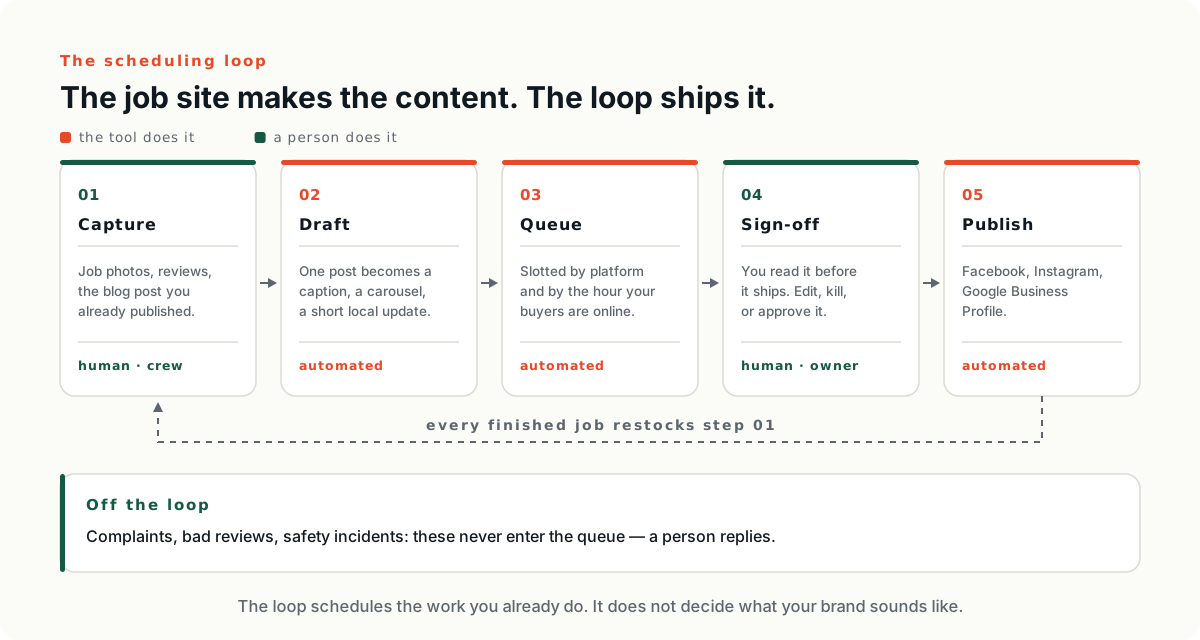
It will not decide what is worth saying. It will not tell you that the third furnace photograph this month is one too many. It will not notice that a competitor opened two miles down the road.
It also will not fix an empty pipeline. A queue with nothing in it is still a queue. The scheduling layer multiplies whatever capture habit you already have, and multiplying zero is a well understood operation.
And if you are still choosing a tool, the meter it bills on will shape your setup more than any feature on the page — a per-channel meter and a per-seat meter push you toward different habits. That comparison is the pillar for this cluster, and it is worth reading before you connect anything.
Next: the six billing meters behind these tools