Accuracy is where comparisons of podcast to text AI tools usually start. We shopped the other column instead: the ceilings — a length cap, a monthly import count, an export limit, a graphics card you do not own. A ceiling is a row in the vendor's own pricing table with a real number in it, and it is the row that decides whether a seventy-minute episode goes through at all.
Why we shopped the ceilings instead
Our position, not a benchmark: transcription quality is rarely the thing that kills a weekly episode. What kills it is structural. You upload a seventy-minute recording and the plan declines it. It goes through and eats most of a monthly allowance. The transcript is clean and getting it somewhere useful still costs an hour.
That distinction matters because of what you can actually verify before you pay. An accuracy percentage only tells you something if the vendor states the conditions behind it — accent, crosstalk, room noise — and gives you a way to repeat the test; check whether the one you are reading does. A length cap is a row in a pricing table with a real number in it. Shop the row you can check.
The ceilings each one publishes
The repurposing workflow already covers how content tools bill and why two pricing pages rarely line up side by side. This is the other half of the same page: not the unit that puts a price on a file, but the ceiling that refuses one. Three products, three different ceilings, and none of them is about quality.
Otter — an upload is metered apart from a meeting
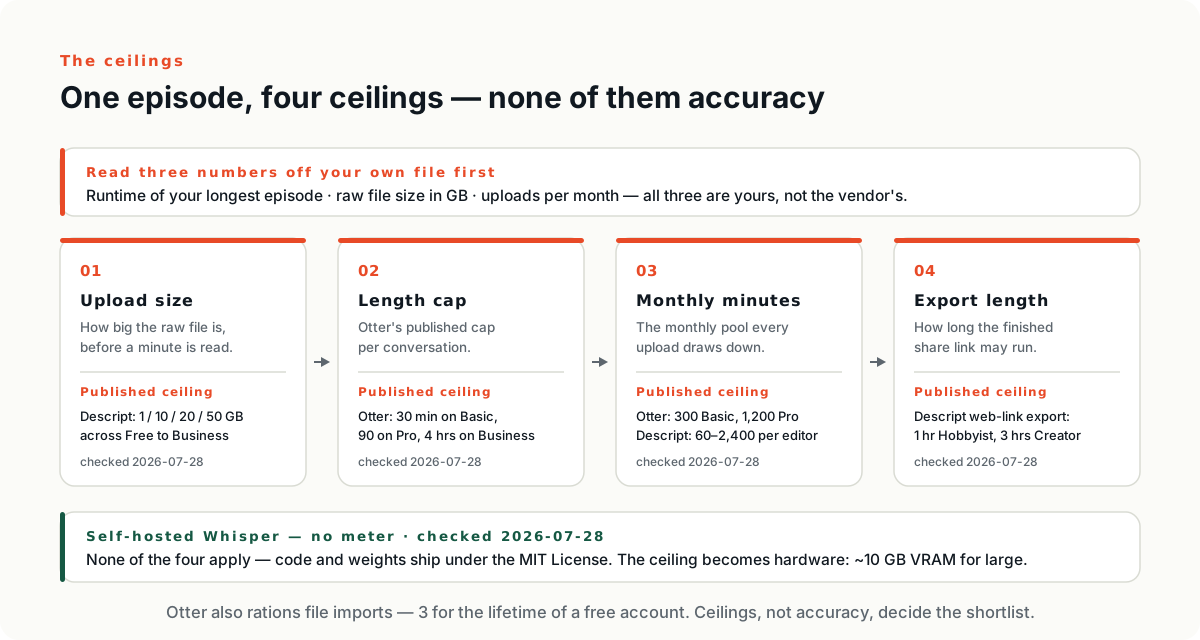
Otter's pricing page lists four tiers — Basic, Pro, Business and Enterprise — billed per user per month behind a monthly and annual selector. The rows that matter for a podcast are the import rows, because the table meters an uploaded file separately from a meeting. Imported files carry their own monthly minutes, in a row labelled “Imported file transcription monthly limit (no rollover)”: 300 minutes per user on Basic, 1,200 on Pro, 6,000 on Business and Enterprise — and on the first two, a footnote marks that allowance as a shared pool across all transcription types. They also carry their own count: three lifetime per user on Basic, ten monthly per user on Pro, unlimited above. A third row, “Max transcription time per conversation”, publishes 30 minutes on Basic, 90 minutes on Pro and four hours on Business and Enterprise; the page does not say whether an uploaded file counts as a conversation, so treat that one as a limit to test rather than to assume. Checked 2026-07-28.
The split is the thing to notice. Otter's own homepage positions the product around meetings it joins and transcribes live, naming Zoom, Google Meet and Microsoft Teams. A file you recorded somewhere else is a different action with its own rows in the table, rationed separately. A podcast is always that action.
Descript — media minutes, divided per editor
Descript publishes five tiers — Free, Hobbyist, Creator, Business and Enterprise. Free costs nothing, Enterprise is quote-only (“Custom”), and the three in between carry a per person/month price behind a monthly and annual selector advertising “Save up to 35% with annual billing”. Its usage meter is labelled “Media minutes (per editor)”: 60 a month on Free, 600 on Hobbyist, 1,800 on Creator, 2,400 on Business. Two more ceilings sit beside it. Video export by web link runs one hour on Free and Hobbyist against three hours on Creator and Business, and the published file size ceiling climbs 1 GB on Free, 10 GB on Hobbyist, 20 GB on Creator and 50 GB on Business. Checked 2026-07-28.
Per editor is the phrase to hold on to. The allowance attaches to the seat, not the workspace, so a second person who only reviews transcripts brings an allowance you may not need. Descript's homepage sells the editing model as a metaphor — “With Descript, video editing is as easy as typing” — and presents its AI assistant under the name Underlord. It does not spell out the mechanics on that page, so test it on the free tier rather than taking the metaphor on trust.
Whisper — no meter, a machine instead
Whisper is not a product with a login screen. It is OpenAI's speech recognition model, and its repository states that the code and model weights are released under the MIT License. No tier, no billing selector, no per-minute charge. The repository lists six model sizes, from tiny at 39 million parameters and roughly 1 GB of VRAM up to large at 1.55 billion parameters and roughly 10 GB, plus a turbo size at 809 million and roughly 6 GB. Running it wants Python, PyTorch and ffmpeg. Checked 2026-07-28.
So the ceiling moved rather than disappeared. It is now the card in the machine and the person who keeps the pipeline running. There is no import allowance, and no support queue either.
Two of the three publish a limit that has nothing to do with transcription quality and everything to do with the shape of the file you hand over. The third swaps the limit for hardware. None of those limits is about accuracy.
Why podcast audio hits ceilings that meeting audio does not
Only one of the three is built and priced around meetings: Otter. Descript sells itself on video editing, and Whisper has no meeting surface at all. But a meeting is a different object from an episode, and wherever a ceiling comes from, four properties of an episode are what run into it.
- ›Length — an episode routinely runs past an hour, which is exactly where the published per-conversation caps sit.
- ›File size — a long multitrack session is measured in gigabytes, and upload size is published as its own ceiling, separate from length.
- ›Count — you produce few files rather than many, so an allowance of ten uploads a month is plentiful and three for the lifetime of an account is not.
- ›Origin — you recorded it elsewhere, so it arrives as an upload rather than as a meeting the tool sat in and captured live.
Read those four against a pricing table and the shortlist usually writes itself, before anyone has mentioned a word error rate.
Read three numbers off your last episode
Before you open a pricing page, open your most recent recording. Three numbers, and all three are properties of your own file rather than anything a vendor publishes.
- 01Runtime of your longest episode, in minutes. Not the average — the longest. Caps do not average.
- 02File size of the raw recording, in gigabytes. A multitrack session is far larger than the audio you export from it.
- 03Episodes per month, counted as uploads. This is the number that meets an import allowance.
Write them on paper first. Then a pricing page stops being a comparison and becomes a yes-or-no check, which is a much faster thing to run.
Where webinar audio is different
A webinar transcript carries the words and nothing that was on the screen. A line reading “as you can see here, this number jumped” is not recoverable at any accuracy, because the information was never in the audio. No transcription setting fixes that; it is not a transcription problem.
Webinar-heavy teams need a second capture running alongside the transcript — a screen recording, or someone noting slide changes against timestamps while it happens. Treat it as part of capture, not as cleanup. Reconnecting words to a screen afterwards is slow, and it is the step that quietly does not get done.
When the built-in transcript is enough
If you record a handful of times a year, whatever transcript your recording platform already produces is probably close enough, and a subscription mostly buys you a meter to watch. A dedicated tool starts paying when transcription becomes a recurring input to something else — the first step of a cycle you run every week, not a document somebody reads once.
The same test applies one layer up. A team publishing sporadically does not need a formal repurposing system. A team publishing weekly does, and skipping it is what turns having a podcast into having a folder of transcripts nobody opened.
What none of them do for you
The repurposing workflow makes the case that transcription is close to solved, and that the real constraint moved to selection — a long recording holds only a few genuinely useful minutes, and finding them is human work. This article sits underneath that claim rather than repeating it. Choosing well here gets you a transcript reliably and cheaply. It does not get you the three passages worth publishing.
Which is the right order to think in. Pick the tool that clears your ceilings, then spend what you saved on the part no product meters.
Next: the workflow this transcript feeds into