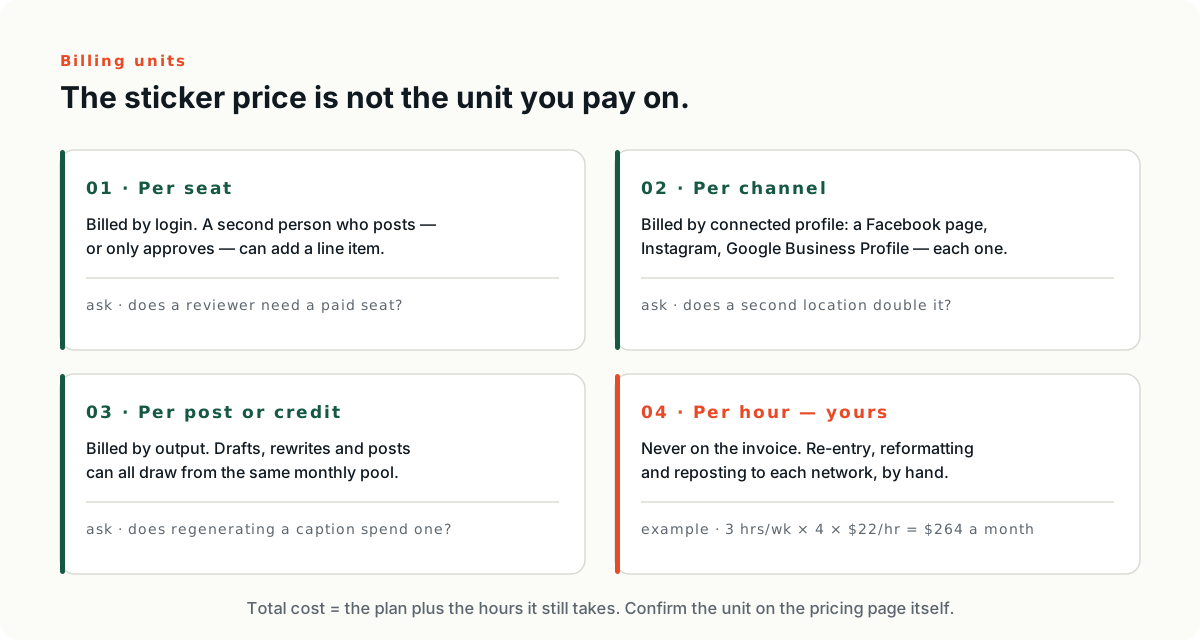
A budget social media platform can be cheap on the invoice and expensive somewhere else. That is not a scam. It is what budget means in this category: a plan priced for one person assumes one person will absorb the work the plan does not do. The real number has two lines, and only one of them is printed on the pricing page.
The question everyone types, and the question that answers it
Type the question most people type — which budget-friendly social media platform is best for a startup — and a ranked list is what the question invites. A ranked list cannot answer it. Our pricing pillar makes the case at length: the tools a small team shortlists bill on different meters, so which one wins flips depending on whether you have more people or more accounts. Cheap is a property of the fit, not of the product.
So this article assumes you have already read the meters and the budget is still small. That is the normal case for a service business in its first few years, and it is a different problem from choosing between two enterprise suites. The question is not which platform is cheapest. It is which platform stays cheap once your own people have to run it.
Cheap is two lines, and only one is printed
The subscription is the line you can read. The second line is what it costs your business to operate the tool for a month — the minutes somebody spends reformatting a caption for the third network, re-uploading photos that already exist somewhere else, and checking that nothing published a wrong claim about your service area.
The pricing pillar counts edit time among the costs that never show up on a pricing page. For a company with a marketing department that is a footnote. For a two-truck operation it is the entire decision, because the second line comes out of the same person who answers the phone, schedules the crew, and chases the invoice.
Three checks that come before price
None of these three sit at the top of a feature comparison. All three decide whether the cheap plan stays cheap, and all three can be answered before you look at a number.
Does it reach where your customers actually look
Coverage is not a feature list. It is your own list of accounts, checked one at a time against the vendor's integrations page. Write that list yourself first — a Facebook page, an Instagram account if the work photographs well, a Google Business Profile, whatever you actually own and would actually post to. Then check each one by name rather than trusting a promise to publish everywhere, because a network the platform does not publish to is a network you will be posting to by hand, forever, for free.
Does one input produce many outputs
A scheduler takes a post you already wrote and releases it later. That is a calendar with a login, and it does nothing to the second line. What moves the second line is a product that takes one finished job — the photos, the invoice line, the before and after — and produces the platform-native versions from it. The repurposing workflow calls those derivatives. How many you get from one source asset is the ratio your budget actually rides on.
Is there somewhere to say no before it publishes
The case for an approval gate is already made in the repurposing workflow, so we will not remake it. The buying question is narrower and easier to answer: does this product have a draft or approval state on the tier you can afford, or does it sit two tiers up? Find that row on the comparison table and read it before you read the price. A wrong claim about your service area, published under your own logo, costs more to unwind than any plan in this category costs to run.
What the free plans actually are
Free tiers show you the shape of a product without a sales call, which is more than most feature pages manage. They are also not plans. A free tier is a shaped sample, and the shape tells you what the vendor expects you to outgrow first. Four we loaded on July 28, 2026:
- ›Buffer. The free plan connects up to 3 channels, holds 10 scheduled posts per channel, and includes 1 user account. The page's own wording for the queue is “refill anytime”, and its FAQ on the same page adds that once a post is published the slot becomes available again. Source: buffer.com/pricing, checked July 28, 2026.
- ›Metricool. The free plan manages 1 brand, schedules up to 20 posts per month, analyzes 5 competitor profiles, and gives 30 days of analytics; the page states it covers your brands' social networks except LinkedIn and Twitter. Source: metricool.com/pricing, checked July 28, 2026.
- ›Publer. The plan the page labels “Free forever” includes 1 user, 1 workspace, 3 social accounts with X excluded, 10 scheduled posts per account, 25 saved drafts, and 24-hour post history. Source: publer.com/plans, checked July 28, 2026.
- ›Later. Its pricing page lists three paid plans — Starter, Growth, and Scale — plus a 14-day trial, and shows no free column in the comparison table. Later's own Help Center does document a Free plan: limited post scheduling, a customizable Link in Bio page, introductory analytics, and 1 Access Group — with no number attached to “limited”. Sources: later.com/pricing and help.later.com, “Choose a Later Social Plan”, both checked July 28, 2026.
The first thing to notice is that none of them caps a single variable. Buffer caps channels and queued posts per channel and users. Metricool caps brands and monthly posts and leaves two networks out. Publer caps accounts, queued posts, saved drafts, and how long your published history survives. Now notice what none of them caps. At 20 posts a month, or 10 sitting in a queue, the automation is you.
Red flags worth catching before you sign
Any one of these on its own is survivable. Two together, and you are paying a subscription while your own people still do the work by hand.
- ›It cannot reach the systems where your content already lives. If job photos sit in your field service software and reviews sit in the Google Business Profile, and the platform connects to neither, somebody re-uploads them by hand every week. That is the second line, written into the product.
- ›One input produces one output. If publishing to three networks means writing three captions, you bought a calendar and called it automation.
- ›No draft or approval state on the tier you are actually going to buy.
- ›Analytics that stop at reach. Likes and impressions are not the number. Calls, form fills, and booked jobs are. A platform that cannot connect a post to a phone call cannot tell you whether to renew.
- ›A meter that ticks on whatever you are about to add more of. Which vendor runs which meter is in the pricing pillar; the part only you can do is write down what your business looks like twelve months out, then price that business instead of this one.
What a service business is actually buying
A software company buys a content program — a calendar, a voice guide, a cadence mapped to a funnel. A roofing company buys something simpler and harder: visible evidence that finished work keeps happening. Picture the prospect with three quotes on the counter. They open Facebook, see a run of recently finished jobs, and quietly stop treating you as the risky bid.
That difference is why so many platforms feel oversized here. You are not moving a lead through five nurture stages. You are proving competence, one finished job at a time, on the two or three surfaces a local buyer already checks before calling. A platform that makes that loop cheap to run is a budget platform. A platform that costs little and makes that loop expensive is just a cheap subscription.
Next: the six billing units, named